
How I Turned SilverBullet, ChatGPT, and Raycast Into a Personal Knowledge System I Actually Use
I’ve tried countless systems for notes, journals, projects, and personal knowledge. The problem was never storage. It was friction. If capturing and organizing a thought takes too many steps, I stop doing it. This setup finally changes that.
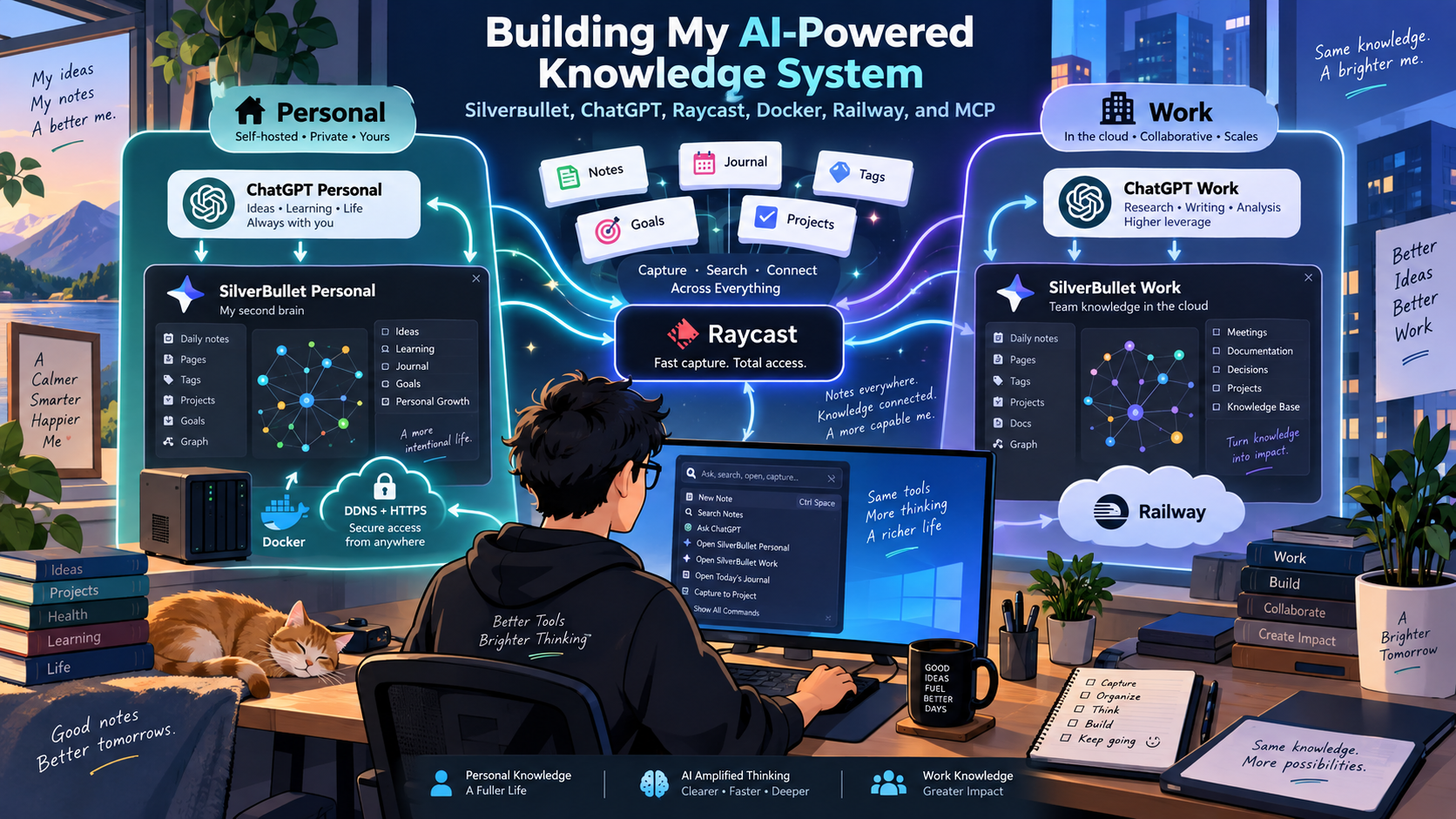
I’ve spent years trying different approaches to notes, journals, project tracking, and personal knowledge management. The problem was rarely where to store the information. The problem was friction.
If capturing a thought requires opening an app, finding the right page, deciding where it belongs, tagging it correctly, and maintaining all of that structure manually, I eventually stop doing it.
My current setup changes that.
I now use SilverBullet as the persistent knowledge layer behind both my personal and professional AI workflows. ChatGPT can read and write to the appropriate SilverBullet vault, Raycast gives me near-instant access from Windows, and the AI handles much of the organizational work: daily journals, weekly journals, projects, goals, objectives, tags, relationships, and durable notes.
The result is less like “an AI that can access my notes” and more like a persistent memory system that multiple AI interfaces can share.
And, most importantly, it has become easy enough that I actually use it throughout the day.
Architecture
At a high level, I keep my personal and work knowledge physically separated, but allow different AI interfaces to connect to the appropriate environment.
Public endpoint"] SBP --> MCP_P MCP_P --> DDNS end subgraph WORK["Work Knowledge\n[railway]"] direction TB SBW["SilverBullet Work"] MCP_W["Work MCP"] SBW --> MCP_W end subgraph AI["AI Interfaces"] direction TB CGP["ChatGPT Personal"] CGW["ChatGPT Work"] RC["Raycast on Windows
Alt+A Quick Chat"] end DDNS --> CGP DDNS --> RC MCP_W --> CGW MCP_W --> RC classDef personal fill:#eef2ff,stroke:#818cf8,stroke-width:2px; classDef work fill:#f0fdfa,stroke:#2dd4bf,stroke-width:2px; classDef interfaces fill:#f5f3ff,stroke:#a78bfa,stroke-width:2px; class PERSONAL,SBP,MCP_P,DDNS personal; class WORK,SBW,MCP_W work; class AI,CGP,CGW,RC interfaces; style PERSONAL stroke:#818cf8,stroke-width:2px,stroke-dasharray:5 5 style WORK stroke:#2dd4bf,stroke-width:2px,stroke-dasharray:5 5 style AI stroke:#a78bfa,stroke-width:2px
The important architectural decision is that Personal and Work are not simply folders in one giant AI-accessible knowledge base.
They are separate SilverBullet environments with separate access paths.
That separation gives me a much cleaner trust boundary:
- ChatGPT Work can access my work knowledge.
- ChatGPT Personal can access my personal knowledge.
- Raycast on my work computer can access both, because I intentionally configured it that way.
- The underlying Markdown remains portable and understandable without any of these AI tools.
Why SilverBullet Became the Center of the System
I originally approached this as a note-taking problem. What I actually needed was a persistent context problem. I wanted an AI assistant to know things like:
- What projects am I currently working on?
- What are my company goals?
- What objectives roll up into those goals?
- What decisions did I make two weeks ago?
- What happened during a particular workday?
- What personal projects am I considering?
- What did I learn about a topic several months ago?
- Who was involved in a decision?
- What other notes are related to this idea?
Traditional note-taking applications are good at storing this information. The harder part is maintaining it. I wanted to be able to say:
Take note that we decided to move this service to Kafka.
Or:
Add this to today’s journal.
Or even just work through a problem with an AI assistant and have the relevant project progress, decisions, blockers, and next steps captured appropriately.
SilverBullet turned out to be a particularly good fit because it is fundamentally a server-first Markdown knowledge system.
The data is still just Markdown. I can open it myself. I can link pages. I can tag concepts. I can create project pages, goal pages, journals, diagrams, and reference material. But unlike a desktop-only note application, it is also naturally accessible to MCP services and remote AI clients.
The AI Is Becoming the Organizational Layer
The part I find most interesting is that I am spending less time deciding exactly where information belongs.
I have given the AI a set of conventions around my SilverBullet spaces.
For example, it knows that my knowledge base contains concepts such as:
- Goals
- Objectives
- Projects
- Daily journals
- Weekly journals
- Decisions
- People
- Technical topics
- Tags
When something meaningful happens, the AI can relate it to those existing concepts rather than creating an isolated note.
If I spend part of the day working through an architecture problem, I might end up with:
Journal/2026-09-15
    |
    +-- worked on validation architecture
    +-- decision made about Kafka flow
    +-- blocker involving deployment
    |
    +--> Project/Validation Service
    |
    +--> Goal/Platform Modernization
    |
    +--> #kafka
    +--> #fhir
    +--> #architecture
I do not have to manually maintain every one of those relationships.
That is one of the places where AI adds much more value than simple text generation.
It can act as the librarian.
My Personal SilverBullet Runs Locally in Docker
For my personal environment, I wanted to keep things close to home.
SilverBullet Personal runs as a Docker container on my own machine using a persistent Docker volume.
That gives me a few things I care about:
- The source Markdown lives under infrastructure I control.
- I am not dependent on a SaaS note-taking platform.
- I can back up the entire environment myself.
- I can expose only the specific MCP interface I want available externally.
- I can change the surrounding architecture whenever I want.
The SilverBullet interface itself remains local, while the MCP service is exposed securely through my existing home network setup.
I already had DDNS and TLS certificates in place, so I used that infrastructure to make the Personal MCP endpoint reachable from ChatGPT.
That worked surprisingly well for my personal ChatGPT account.
Once the MCP endpoint was reachable and OAuth was configured correctly, ChatGPT could treat my SilverBullet instance as a persistent external knowledge source.
Then ChatGPT Work Refused to Cooperate
This was probably the most frustrating part of the entire setup. My personal ChatGPT environment could reach the MCP service running from my home network. ChatGPT Work could not.
I tested different endpoints, ports, OAuth settings, and configurations. I even exposed the same type of service through different external ports to isolate whether the problem was specific to one endpoint.
The MCP discovery and OAuth metadata looked correct. The endpoints worked externally. My Personal ChatGPT account could connect. But my Work ChatGPT environment still would not reliably discover or connect to the locally hosted MCP service. At that point, I stopped treating it as an application configuration problem and started treating it as an infrastructure boundary.
Rather than continuing to fight whatever networking or organizational restrictions existed between ChatGPT Work and my home-hosted service, I moved the work environment to Railway. That solved the problem almost immediately.
SilverBullet Work Runs on Railway
My work SilverBullet environment now runs on Railway.
I run the SilverBullet service and the MCP service separately.
Railway provides the public HTTPS endpoint for MCP, while the MCP service can communicate with SilverBullet over Railway’s private internal network.
This ended up being cleaner than forcing my work AI environment through my home network anyway. It also gave me a stronger architectural separation:
Personal data
    -> Home infrastructure

Work data
    -> Railway infrastructure
That distinction now feels less like a workaround and more like the right design.
Raycast Changed the Capture Experience
Once both SilverBullet environments were working through MCP, I added another interface: Raycast for Windows. This is where the system started feeling dramatically different from a normal note-taking setup. Raycast can access both my Work and Personal SilverBullet MCP servers.
More importantly, I bound:
Windows + Ato immediately open a Raycast Quick Chat connected to my SilverBullet Work skill.
So while I am working, I can hit a keyboard shortcut and type something like:
Take note that we decided to move the QA handoff discussion to tomorrow. The primary blocker was uncertainty around ownership of validation failures.
Then I am done. I do not have to:
- Open SilverBullet.
- Navigate to today’s journal.
- Find the right section.
- Add the note.
- Link the project.
- Add tags.
- Remember whether it should also update another page.
The AI can do that organizational work. This changes the economics of journaling. A 30-second interruption becomes a five-second interaction. That difference is enormous over the course of a workday.
ChatGPT and Raycast Are Just Different Doors Into the Same Memory
One thing I deliberately avoided was building separate knowledge stores for each AI interface.
Raycast does not have “Raycast notes.” ChatGPT does not have a completely separate project memory. Instead, SilverBullet is the durable layer.
Persistent Knowledge"] CHAT["ChatGPT
Long-form reasoning"] RAY["Raycast
Fast capture"] WEB["SilverBullet UI
Direct editing"] CHAT <--> SB RAY <--> SB WEB <--> SB
Each interface is good at something different. ChatGPT is where I tend to have longer conversations, reason through architecture, plan projects, explore ideas, and synthesize information. Raycast is where I want speed. SilverBullet itself remains available when I want to browse or edit the Markdown directly.
But they all operate on the same persistent knowledge.
Work and Personal Stay Separate
I was fairly strict about this from the beginning.
My Work AI instructions explicitly say that the Work SilverBullet space is for Lantana/work information. Personal information should not be stored there.
Likewise, my personal environment is where personal projects, family notes, ideas, learning, DIY projects, and personal goals belong.
This lets me give the AI fairly broad permission to organize information without creating one enormous mixed-context database.
There is still overlap at the interface level. Raycast can intentionally access both. But the underlying persistence remains separated. That matters for security, but it also matters cognitively. I do not want a search for a work architecture decision returning unrelated personal projects.
Goals, Objectives, Projects, and Journals
I am still evolving the structure, but I have landed on a hierarchy that feels natural.
At a high level:
Goals
  |
  +-- Objectives
        |
        +-- Projects
              |
              +-- Tasks / decisions / progress

Journals
  |
  +-- Daily
  |
  +-- Weekly

Tags
  |
  +-- Connect everything horizontally
Goals answer:
What am I trying to accomplish?
Objectives make those goals more concrete. Projects represent active bodies of work. Daily journals capture what actually happened. Weekly journals provide a higher-level summary and reflection. Tags create relationships that do not fit neatly into a hierarchy. This gives the AI several ways to find relevant context.
A journal entry about Kafka might connect simultaneously to:
- a specific project,
- a company goal,
- a technical decision,
- a coworker,
#kafka,#architecture,- and the date it happened.
That is much more useful than a folder full of chronological notes.
Backups Became Part of the Architecture Too
Once I started trusting the system with meaningful knowledge, backups became non-negotiable.The Personal environment is backed up directly from its Docker volume. The Work environment is pulled from Railway over SSH.
The backup process stages both environments and creates an encrypted archive using 7-Zip with AES-256 encryption. The encrypted archive is then stored in a OneDrive-backed directory.
So there are several layers:
Docker volume"] --> B["Backup Script"] W["Work
Railway /space"] --> B B --> ZIP["AES-256
Encrypted Archive"] ZIP --> OD["OneDrive"] PW["Archive Password
Windows DPAPI"] --> B
The archive password itself is not stored in plaintext. It is protected using Windows DPAPI and tied to my Windows user account.
The Railway side uses SSH authentication.
Because my SSH private key is passphrase-protected, Windows ssh-agent keeps the unlocked key available to the scheduled backup.
I also added failure email notifications. If the backup fails because:
- Docker is unavailable,
- Railway authentication breaks,
- the SSH key is unavailable,
- the Railway volume cannot be downloaded,
- 7-Zip fails,
- or another unexpected exception occurs,
The PowerShell script logs the failure and sends me an email. That last piece matters. A backup job silently failing in Task Scheduler is barely better than having no backup at all.
What I Like Most About This Setup
The biggest improvement is not any individual tool. It is that I finally have a clear separation of responsibilities.
- SilverBullet owns the knowledge.
- Markdown owns the data format.
- MCP provides the interface.
- ChatGPT handles deeper reasoning and organization.
- Raycast handles immediate capture.
- Docker gives me local control.
- Railway gives me reliable remote work hosting.
- DDNS lets my personal environment remain self-hosted while still being reachable.
- OneDrive gives me another backup layer.
- Each component is replaceable.
That is important to me. If I stop using Raycast tomorrow, my notes still exist.If I move away from ChatGPT someday, my notes still exist. If I replace SilverBullet, I still have Markdown. The intelligence layer can evolve without taking my knowledge with it.
The Unexpected Benefit: Better Journaling
I originally built this because I wanted better AI context.
What surprised me is that it is also making me a better journaler. I have historically been terrible at consistently documenting what I do throughout the day. Not because I do not value it, but because the overhead always outweighed the immediate benefit.
Now I can capture decisions, observations, accomplishments, frustrations, and ideas almost as quickly as I can think of them.
And because the AI can structure those entries afterward, I do not have to organize every thought at the moment of capture. That is a much more natural workflow.
Capture first. Organize automatically. Reflect later.
Where I Think This Is Going
I am still early in using the system this way, but I think this pattern is much more interesting than simply giving an AI access to a notes folder. The real opportunity is persistent, user-owned context.
Instead of every AI conversation beginning largely from scratch, the assistant can operate against a durable knowledge graph that I control.
Over time, that means it can understand:
- what I am working toward,
- what I have already tried,
- what decisions I made,
- which projects are active,
- what happened last week,
- how ideas relate to one another,
- and what information is worth preserving.
I do not want the AI to become the database. I want the AI to help maintain the database. That distinction is important. SilverBullet is the memory. ChatGPT and Raycast are ways of interacting with it. And right now, that combination is working better for me than any note-taking system I have tried before.